
The Brother MFC-T780DW Inkvestment Tank Wireless Color Inkjet All-in-One Printer is the kind of product name that makes you want to sit down before you start shopping. It sounds like a printer, a refill system, and a small office supply catalog compressed into one line. Before spending money, focus on three things: whether the exact model is genuine and supported, whether the ink economics fit your workload, and whether the printer handles the annoying daily tasks well enough to earn desk space.
This is not a glamorous purchase. Nobody has ever gathered friends around a printer box and said, “You have to see this.” But a dependable all-in-one can save repeated trips to a print shop, keep school forms moving, and make a home office feel less improvised. The wrong one can turn a simple five-page job into a Wi-Fi troubleshooting session.
1. Verify the exact model before comparing prices
The first issue with the Brother MFC-T780DW Inkvestment Tank Wireless Color Inkjet All-in-One Printer is the model number itself. Brother sells different printer families in different countries, and names that look nearly identical can use different ink bottles, software, warranties, and electrical requirements. A listing can also combine a genuine Brother name with a vague seller description or an imported unit.
Before clicking Buy, zoom in on the product label and confirm the model number, included bottles, voltage, language settings, and warranty terms. Look for a seller with a clear return policy and a product page that identifies replacement ink by the correct bottle family. A dramatically low price is not automatically a bargain if the printer is imported, refurbished without clear disclosure, or difficult to supply in the United States.
This is where the spec sheet stops helping. The useful question is not simply whether the machine prints, scans, copies, or sends a fax. It is whether you can still buy the right supplies six months from now without hunting through questionable marketplace listings. Search the model number and ink code together, then confirm that the results come from Brother or established retailers such as Staples, Office Depot, Walmart, or Amazon’s manufacturer storefront.
2. Understand what the tank system changes
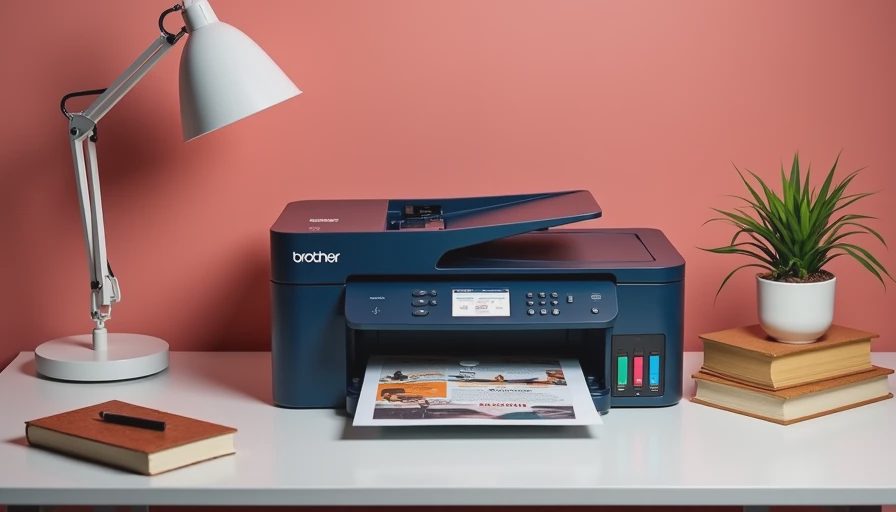
The Brother MFC-T780DW Inkvestment Tank Wireless Color Inkjet All-in-One Printer is aimed at people who dislike traditional cartridges. Instead of replacing a small cartridge every time one color runs low, a tank-style printer uses bottles to refill larger reservoirs. That can reduce the cost per page when you print regularly, especially for homework, invoices, recipes, shipping labels, and color handouts.
The savings are most convincing when the printer is used consistently. A family printing several times each week gets more value than someone who prints three pages every two months. Ink tanks also tend to require a larger upfront commitment, and the refill process is less elegant than snapping in a cartridge. It is usually manageable, but you still need a steady hand, a place to store bottles, and enough patience not to rush a refill beside a white shirt.
Do not confuse a low cost per page with unlimited printing. Color coverage changes the result. A mostly black document uses far less ink than a full-page photo or a school project filled with colored backgrounds. Paper quality matters, too. Standard copy paper is fine for documents, while photos and graphics look better on paper designed for inkjet printing.
If your monthly output is light, a conventional cartridge printer can still be simpler. If you print often and hate recurring cartridge purchases, the tank approach becomes much easier to justify. The Brother MFC-T780DW Inkvestment Tank Wireless Color Inkjet All-in-One Printer makes sense only when the refill system matches your habits rather than merely sounding economical in an advertisement.
3. Judge the wireless and all-in-one experience
Wireless printing is valuable when it works quietly in the background. A good setup lets a laptop in a home office, an iPhone in the kitchen, or a child’s Chromebook send a document without moving files to a USB drive. Check whether the listing and official documentation support the operating systems and mobile apps you use. Also confirm whether the printer connects to your normal Wi-Fi band and whether setup requires an account.
The Brother MFC-T780DW Inkvestment Tank Wireless Color Inkjet All-in-One Printer should also be judged by its scanner and copier, not just its print engine. A flatbed scanner is useful for signed forms, receipts, passports, and old family photographs. Automatic document handling, if included on the exact version, can save time when copying or scanning multiple pages. Those details matter more to a small business than a slightly faster first-page time.
Think about noise, size, and access. A printer that lives on a shelf behind a monitor is annoying if the paper tray requires constant rearranging. A front-loading design is easier in a tight office. Make sure there is room to open the scanner lid and reach the ink tanks. The best printer is often the one you can refill and troubleshoot without moving three other pieces of equipment.
Who should buy it, and who should skip it?
The Brother MFC-T780DW Inkvestment Tank Wireless Color Inkjet All-in-One Printer is most appealing for a home office, side business, or busy household that prints regularly and wants color without paying cartridge prices every few weeks. It is also a reasonable fit for someone who wants scanning and copying in the same footprint instead of buying separate devices.
It is a weaker choice for a person who prints only occasional return labels, a few black-and-white forms, or one vacation itinerary every season. That buyer may be better served by a basic monochrome laser printer, particularly if sharp text and long periods of storage matter more than color. A laser model also avoids the drying concerns associated with inkjet printers, although it will not be the right tool for inexpensive color pages.
Photo-focused buyers should slow down, too. An everyday color all-in-one can produce attractive graphics and casual photos, but it is not automatically a dedicated photo printer. If gallery-quality images are the priority, compare color accuracy, paper support, borderless printing, and replacement ink cost rather than assuming a large tank equals better photography.
What to check during the first week
After setup, print a black text page, a color document, and a test scan. Confirm that text looks clean, colors appear even, and the scanner saves files where you expect. Print from both a computer and a phone if those are part of your routine. This quick test catches Wi-Fi problems while the return window is still open.
Record the included ink and save the bottle packaging until you know the printer is staying. Then locate replacement supplies from a reliable retailer and write the model or ink code inside your desk drawer. That small step prevents the classic Sunday-night problem: a printer that works perfectly except for the one bottle nobody can identify.
Also check sleep behavior and paper handling. If the printer wakes every few minutes or feeds envelopes badly, you want to know before it becomes part of your workflow. Firmware updates can improve compatibility, but install them from official Brother software rather than a random driver site.
My practical buying call
If I were buying the Brother MFC-T780DW Inkvestment Tank Wireless Color Inkjet All-in-One Printer today, I would purchase it only from a seller that clearly confirms the US model, warranty, and replacement ink availability. I would not choose it solely because the listing claims a huge page yield. The refill system is valuable when printing is frequent, but convenience and supply access decide whether that value survives real life.
For regular home-office printing, the product category is sensible: tank economics, color output, wireless access, scanning, and copying in one machine. The catch is model verification. If the exact unit is an imported or poorly supported version, a newer Brother tank printer sold directly for the US market could be the smarter buy even at a higher price.
Buy the version of the product you will still like after the excitement wears off. In this case, that means a supported model, easy-to-find ink, reliable wireless setup, and a workload that actually justifies a tank. If those four pieces line up, this printer can be a practical household workhorse. If they do not, the impressive name is just a very long way to say “future frustration.”


No comments yet — be the first to share a thought.